TIMEFROMPARTS function – SQL Server Denali

Written by VidhyaSagar. Posted in General

We are going to discuss another new function that’s going to get released with SQL Server Denali. This function is related to date time category. This is similar to the early function which we saw. Time returns a fully initialized time value. If the arguments are invalid then an error is raised, if you have NULL value in argument then NULL is returned.

Syntax is below

TIMEFROMPARTS ( hour, minute, seconds, fractions, precision )

Lets try with an example

SELECT TIMEFROMPARTS(21,53,33,55,3)
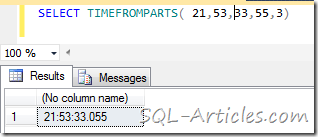
timefromparts

VN:F [1.9.17_1161]
Rating: 5.0/5 (1 vote cast)
VN:F [1.9.17_1161]
Rating: +1 (from 1 vote)
TIMEFROMPARTS function - SQL Server Denali, 5.0 out of 5 based on 1 rating

Tags: , , , ,

Trackback from your site.

Comments (1)

  • DotNetShoutout

    |

    SQL-Articles » TIMEFROMPARTS function – SQL Server Denali…

    Thank you for submitting this cool story – Trackback from DotNetShoutout…

    Reply

Leave a comment

*

Recent Comments

Amit Bhatt

|

Hi Deepak,

Thanks for such a nice article.

You missed one thing to add in code:
@article = ‘all’,

Hence the script will be like this:
EXEC sp_addsubscription
@publication = ‘mypublication’,
@article = ‘ALL’,
@subscriber = ‘Subscriberservername’,
@destination_db = ‘mydestinationdbname’,
@reserved=’Internal’

Error 18486 | Platformblog

|

[...] SQL-Articles » Troubleshooting Login failed Error 18456This is one of the infamous error message (and number) that most of the DBAs …. 18486. Login failed for user ‘%.*ls’ because the account is currently locked out. [...]

VidhyaSagar

|

Naveen,
I’ll check this out and get back to you.

balakiran

|

Thanks man, Very simple & easy to understand !!!!