Today we are going to see another new function introduced in SQL Server Denali. It’s nothing but the FORMAT function.This will be very useful feature to format any data in SQL Server. In previous versions we will be using CONVERT function to do some styling in date time etc. However in Denali for sure this function is going to replace the styling parameter in CONVERT function. You can use this function to format data as you want.
This function uses all valid .NET framework format string. For more on .NET formatting types check out the KB article http://msdn.microsoft.com/en-us/library/26etazsy.aspx. Syntax for this function is below, it has 3 parameters, first one is the data, second is the format type (how you want to display your data), third is culture this is nothing but which language and which country so that the data will be formatted like that. Lets see some examples with datetime, string, currency etc
FORMAT ( value, format [, culture ] )
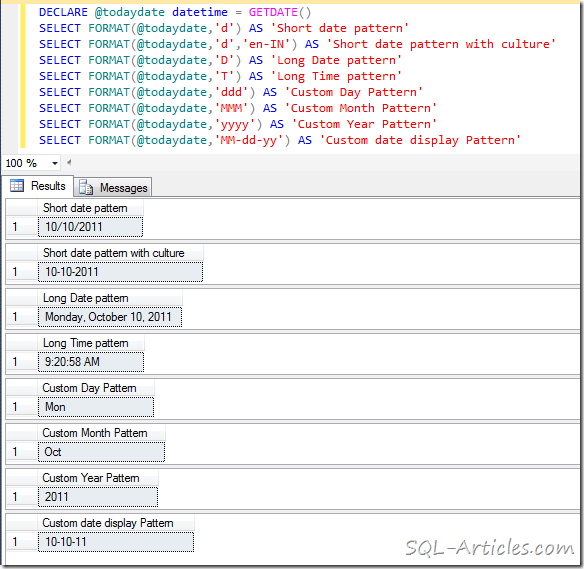
Using FORMAT to display Datetime Data type
DECLARE @todaydate datetime = GETDATE()
SELECT FORMAT(@todaydate,'d') AS 'Short date pattern'
SELECT FORMAT(@todaydate,'d','en-IN') AS 'Short date pattern with culture'
SELECT FORMAT(@todaydate,'D') AS 'Long Date pattern'
SELECT FORMAT(@todaydate,'T') AS 'Long Time pattern'
SELECT FORMAT(@todaydate,'ddd') AS 'Custom Day Pattern'
SELECT FORMAT(@todaydate,'MMM') AS 'Custom Month Pattern'
SELECT FORMAT(@todaydate,'yyyy') AS 'Custom Year Pattern'
SELECT FORMAT(@todaydate,'MM-dd-yy') AS 'Custom date display Pattern'
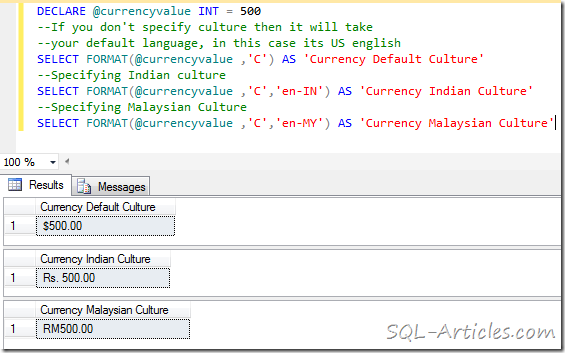
Using FORMAT to display Currency
DECLARE @currencyvalue INT = 500
--If you don't specify culture then it will take
--your default language, in this case its US english
SELECT FORMAT(@currencyvalue ,'C') AS 'Currency Default Culture'
--Specifying Indian culture
SELECT FORMAT(@currencyvalue ,'C','en-IN') AS 'Currency Indian Culture'
--Specifying Malaysian Culture
SELECT FORMAT(@currencyvalue ,'C','en-MY') AS 'Currency Malaysian Culture'
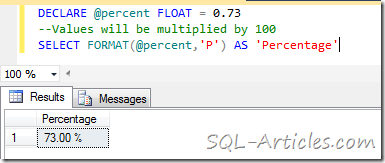
Using FORMAT to display Percentage
DECLARE @percent FLOAT = 0.73
--Values will be multiplied by 100
SELECT FORMAT(@percent,'P') AS 'Percentage'
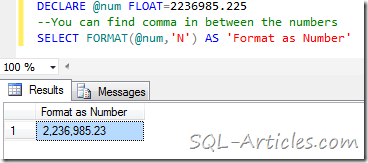
Using FORMAT to display Number format
DECLARE @num FLOAT=2236985.225
--You can find comma in between the numbers
SELECT FORMAT(@num,'N') AS 'Format as Number'
Interesting right!! Test it out, you have lot more formatting option.
Leave a Reply