SQL Server Denali comes with one more new logical function which helps to pull data at the specified index from a list of values. CHOOSE() is the function that’s been added. Again this function exists in Access , so if you migrate the db from Access there is no need to rewrite your query using CASE statement. In simple this function is a short form of CASE statement.
Syntax for this function is below
CHOOSE ( index, val_1, val_2 [, val_n ] )
Let’s populate some data to test this function
USE Tempdb
GO
CREATE TABLE tblchoose(product_id INT, stock bit)
INSERT tblchoose VALUES(1,0),(2,1),(3,1),(4,0),(5,1)
I’m going to choose on product_id column so that based on the input value it will return the product name
SELECT
CHOOSE(product_id,'Driller','Hammer','Axe','Shower Cap','Steel Plate')
AS 'Product Name'
,IIF(stock=1,'In Stock', 'Out of Stock') AS Stock
FROM tempdb..tblchoose
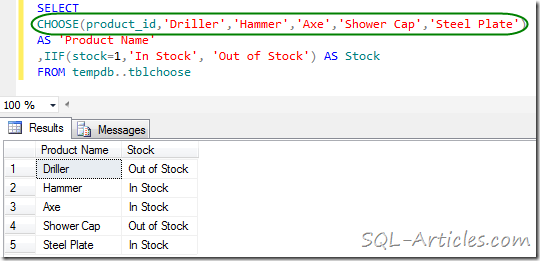
From the query above you can see that it’s returning the data from the specified index , in this case the index is the product name. For 1 it’s returning the value Driller for 3 it’s returning Axe like that based on the input value. If you have more values in index then your choose query will be looking big it’s better if you have lesser index value.
Leave a Reply