There are cases where we need to pass the input parameter to the stored procedure as a comma-separated string in order to avoid multiple db calls from happening. This helps in reducing the db calls thereby reducing the load on the db server.
The below function will split the given comma-separated string into integers and process the results.
IF EXISTS( SELECT [name]
		 FROM [sys].[objects]
		 WHERE [name] = 'fnSplitBigInt'
		   AND [type] = 'TF' )
DROP FUNCTION [dbo].[fnSplitBigInt];
GO
CREATE FUNCTION [dbo].[fnSplitBigInt](
			 -- Add the parameters for the function here
			 @input NVARCHAR(4000))
RETURNS @retBigint TABLE( [Value] [BIGINT] NOT NULL )
AS
BEGIN
DECLARE @bigint NVARCHAR(100);
DECLARE @pos [INT];
SET @input = LTRIM(RTRIM(@input)) + ','; -- TRIMMING THE BLANK SPACES
SET @pos = CHARINDEX(',', @input, 1); -- OBTAINING THE STARTING POSITION OF COMMA IN THE GIVEN STRING
IF REPLACE(@input, ',', '') <> '' -- CHECK IF THE STRING EXIST FOR US TO SPLIT
    BEGIN
	   WHILE @pos > 0
		  BEGIN
			 SET @bigint = LTRIM(RTRIM(LEFT(@input, @pos - 1))); -- GET THE 1ST INT VALUE TO BE INSERTED
			 IF @bigint <> ''
				BEGIN
				    INSERT INTO @retBigint
						 ( Value )
				    VALUES( CAST(@bigint AS [BIGINT]));
				END;
			 SET @input = RIGHT(@input, LEN(@input) - @pos); -- RESETTING THE INPUT STRING BY REMOVING THE INSERTED ONES
			 SET @pos = CHARINDEX(',', @input, 1); -- OBTAINING THE STARTING POSITION OF COMMA IN THE RESETTED NEW STRING
		  END;
    END;
			 RETURN;
			 END;
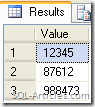
The following is an sample output result set of that function
SELECT *
FROM [dbo].[fnSplitbigint]( '12345,87612,988473' );
Method2
The 2nd method is a much more simpler and optimal way of splitting the comma separated string
DECLARE @xml AS       XML,
	   @str AS       VARCHAR(100),
	   @delimiter AS VARCHAR(10);
SET @str = '12345,87612,988473';
SET @delimiter = ',';
SET @xml = CAST('<X>' + REPLACE(@str, @delimiter, '</X><X>') + '</X>' AS XML);
SELECT [N].value( '.', 'varchar(50)' ) AS value
FROM @xml.nodes( 'X' ) AS [T]( [N] );
Leave a Reply