DotNet 3.5 on Windows 7 to Install SQL Server 2008

Written by VidhyaSagar. Posted in Troubleshooting

This is a quick post to install or enable .Net 3.5 on windows 7. Last couple of weeks Im seeing more questions on installing SQL Server 2008 in windows 7 and the users are unable to install SQL Server 2008 pre-requisite (.Net 3.5 ). To Install SQL Server 2008, windows installer 4.5 & .Net 3.5 is required. Windows installer 4.5 is installed and enabled by default, .Net 3.5 is included in windows features, so you can directly go there and turn on .Net 3.5, windows 7 will automatically install this. To turn on .Net 3.5 in Windows 7 just follow the steps below

  • Login into Windows 7 with admin rights
  • Open Control Panel
  • Open Programs and Features
  • A new window will be pop up, in the left hand pane of Programs and Features you can find Turn Windows Features ON or OFF, click on this
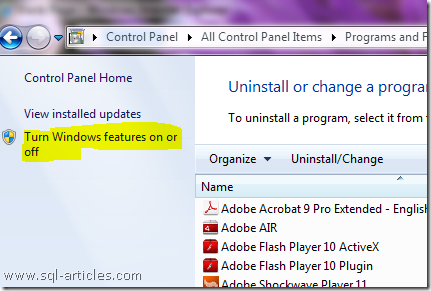
DotNet_windows7_1

  • Windows features dialog box gets open, in that list scroll down and enable the checkbox Microsoft .Net Framework 3.5.1, If needed you can also enable WCF (Windows Communication foundation) and click ok
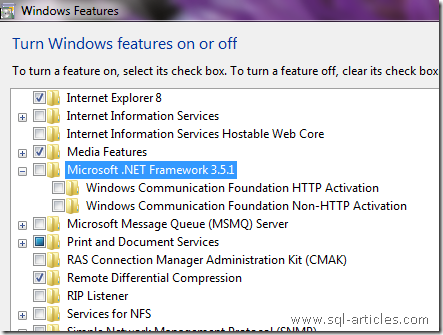
DotNet_windows7_2

  • Windows 7 will install DotNet 3.5 in your machine.
  • Now you can continue with SQL Server 2008 installation.

If you have any questions please post it in our discussion thread.

VN:F [1.9.13_1145]
Rating: 0.0/5 (0 votes cast)
VN:F [1.9.13_1145]
Rating: +1 (from 1 vote)

Tags: , , ,

Trackback from your site.

Leave a comment

*

Recent Comments

VidhyaSagar

|

Thanks Ashish, I’ve updated the script.

Ashish

|

I was just searching some trace related articles and gone through your article. Found one incorrect information,
to disable the trace, the command should be
dbcc traceoff (….)
you might have by mistake mentioned it as traceon for disabling as well.

Ben

|

I remember having to write a complicated procedure to do the same thing recently. This will be nice to use with a web app to only return a small subset. I think this will improve the speed especially when the entire result set is very large.

namanthakral

|

got errors after executing this trigger
“SQL SERVER – Fix : Error : 17892 Logon failed for login due to trigger execution. Changed database context to ‘master’.”

and was really stucked in this mess but DAC saved my life
C:\Users\Administrator>sqlcmd -S LocalHost -d master -A
1> DROP TRIGGER block_ipaddress ON ALL SERVER
2> go