Service pack 1 for SQL Server 2012 has been released on 9th Nov 2012. It took couple of weeks for me to install it in our servers. Before I settle down I got another notification from Microsoft that Cumulative Update 1 has been released for SP1. So I started analyzing what they missed major in SP1 and finally I found a article by Aaron.
There are many new features and fixes are released with Service pack 1. One of the feature with this release is stats DMF sys.dm_db_stats_properties and I started playing with it. Later I came to know that this DMF is already released with SQL Server 2008 R2 SP2 however it’s not released with SQL Server 2012 RTM, only god knows why its not accompanied with 2012 RTM.
sys.dm_db_stats_properties DMF accepts two parameter as input. You need to provide object id and stats id as input, you can get these information using sys.stats DMV. Use the query below to get the information.
USE DBNAME
GO
select object_id ,name,stats_id
from sys.stats where object_id = object_id ('TABLENAME')
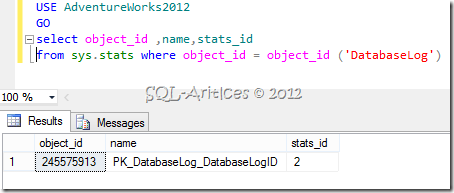
Once you get the details, feed it to the DMF as shown below
USE DBNAME
GO
select OBJECT_NAME (object_id) 'Object Name'
,stats_id
,last_updated
,rows
,rows_sampled
,steps
,unfiltered_rows
,modification_counter
from  sys.dm_db_stats_properties(OBJECTID,STATSID)-- You can get these informations from sys.stats dmv
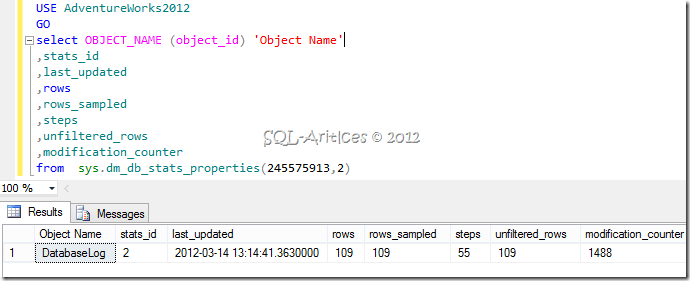
You will get the results and the column description is below
|
ColumnName |
Description |
| Object_ID | ID of the object. In the query above I’ve made it to return the object name |
| Stats_ID | ID of the Statistics |
| Last_Updated | Last when statistics is updated |
| Rows | No of rows in the table when statistics is updated |
| Rows_sampled | No of rows sampled during last update |
| Steps | No of steps in histogram. Histogram step information is not returned in this DMF. |
| Unfiltered_Rows | This is for filtered index. No of rows when you update the statistics for filtered index |
| Modification_Counter | Total number of modification for the column sinced last update |
You could get all these information plus additional information if you use DBCC SHOW_STATISTICS.
USE DBNAME
GO
DBCC SHOW_STATISTICS('TABLENAME','STATSNAME’)
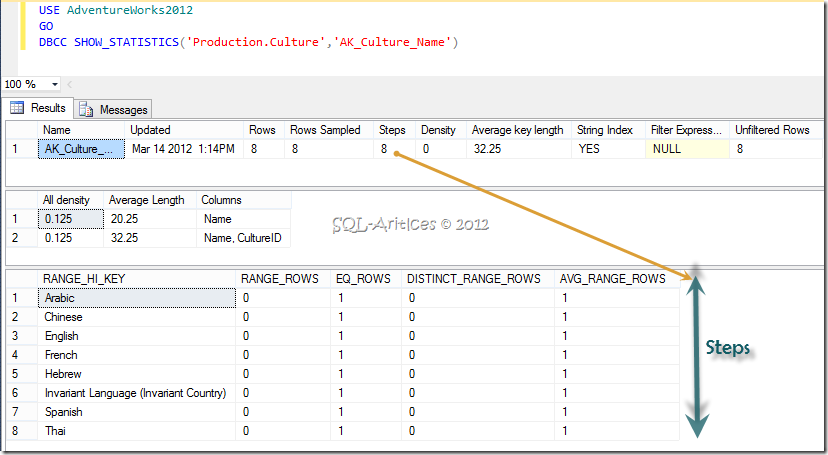
If you could see you will be able to get density information, range key values and all the steps for histogram. I wonder why Microsoft added this DMF? I hope you can’t use DBCC command in select statement however you can use this DMF there, this is the only place I could see its useful. They should provide some value addition with this DMF, lets say we need a column which should tell you whether update is required for the stat or else it should give you information something like average_percentage_fragmentation in index statistics so abased on that we can dynamically update the stats. Hopefully we will get some column with these details in future. So if you aren’t aware of this DMF then it’s time for you to try it.
Leave a Reply