bet365 UK

wordpress joomla template

Day 3–Trace Flag 3688–Suppress Trace information from Errorlog

Written by VidhyaSagar on . Posted in General

In one of our development server we will be frequently running trace files to capture information for performance trouble shooting. However this in turn writes so many entries about trace file in errorlog which fills the errorlog. Errorlog entry is big and we are not to search it easily so to avoid the trace information we used trace flag 3688 in startup parameter of SQL Server. Refer KB article http://support.microsoft.com/kb/922578 for more.

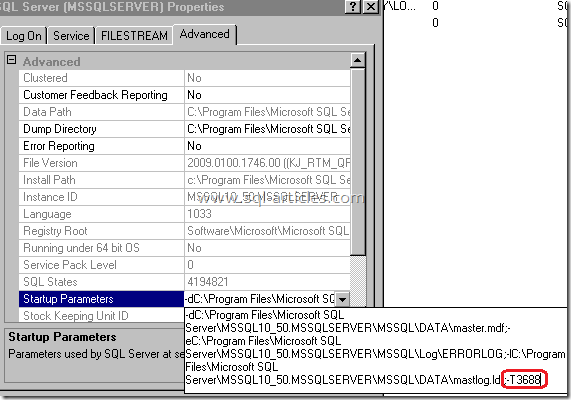
You will see similar information like below 2011-08-03 22:04:15.000 spid52       SQL Trace ID 2 was started by login “sa”. 2011-08-03 22:04:16.690 spid53       SQL Trace stopped. Trace ID = ’2′. Login Name = ‘sa’. 2011-08-03 22:04:26.070 spid52       SQL Trace ID 2 was started by login “sa”. 2011-08-03 22:04:27.750 spid53       SQL Trace stopped. Trace ID = ’2′. Login Name = ‘sa’. I’ve added the trace flag to SQL Server as shown below, this change requires SQL Server to get restarted so ensure you have restarted SQL Server service after you added this trace flag. To know full steps for adding trace flag check the article “Enable \ Disable Trace Flag in SQL Server trace_flag_3688_1 Thus you can utilize the trace flag 3688 if you have more number of trace flags running and filling up your errorlog.
VN:F [1.9.22_1171]
Rating: 0.0/5 (0 votes cast)
VN:F [1.9.22_1171]
Rating: 0 (from 0 votes)

Tags: , ,

Trackback from your site.

Comments (3)

  • DotNetShoutout

    |

    Day 3–Trace Flag 3688–Suppress Trace information from Errorlog – SQL-Articles…

    Thank you for submitting this cool story – Trackback from DotNetShoutout…

    Reply

  • y4up

    |

    Though not many prerequisites but this requires a HOTfix before application, mind your head before doing that. Only thing I counldnt unde1rstand is why would this require the BROWSERservice to be turned off? Is this turning off any kind of sniffing of TDS at SNI (DNN)?

    Reply

    • VidhyaSagar

      |

      That’s right! I hope that’s for Server restart, I’m not sure why that’s require. I think if it’s running then you require a server restart. We don’t have a clear picture on what that hotfix does.

      Reply

Leave a comment

*

Recent Comments

VidhyaSagar

|

Do you want a batch file to script out all the tables in the database using bcp?

Ramesh

|

VidhyaSagar, Could you please provide the batch scripts to extract table data using bcp out into multiple files dynamically from a database

VidhyaSagar

|

@Andres – Sybase date format is not matched with SQL Server date format. If you are using ODBC driver then update in ODBC entry for AFTER connecting.

set temporary option date_order=’MDY’

If this isnt working then check SQL Server default date format and then change accordingly

Andres Gutierrez

|

Hello, I am trying to make this procedure but when I test the connection, right after I give the information on the Login window, appears the following error:

[Sybase][ODBC Driver][Adaptive Server Enterprise]SQL Anywhere Error -157: Cannot convert ’08/10/09′ to a timestamp

Do you have any idea or suggestion to fix this problem? I dont know where that date comes from. Regards. Andres.

Engin Ardıç

|

Thank you for nice article! That’s so helpful for me.

The best bonus by bet365 Ελλάδα 100% for new user.

Full Joomla 3.0 Theme free theme.