In SQL Server Denali we have new feature called contained database that will let you move your database easily. Understood? Whatever I said is a very simple meaning of contained database, let’s see what it’s going to do and how it’s going to help us.
What is Contained Database?
Before going to explain this I need to give you some knowledge on the keywords used .
- Uncontained – An user entity that crosses beyond application boundary. In other words you can access resources outside your application boundary
- Contained – An user entity that resides within an application boundary. In other words you can’t access resources outside your application boundary
- Partial Contained database – It’s a contained database which also allows you to access the objects outside
- Full Contained database – Full containment wont allow you to access the objects outside the application boundary.
As of now SQL Server Denali aka SQL Server 2012 supports only partial contained database. Database movement made easy with the help of contained database , since the users are created within the database, credentials are stored in the db and there is no need to map SID’s as no dependency on server logins. It resolves another problem, if your database collation is different than the server collation then you will be facing problem as tempdb will fetch the collation from server level. In earlier version we will over come this with COLLATE parameter however it’s no longer required as here tempdb will be using the calling database collation.
How to Create Contained Database
Contained database feature is not enabled by default . You need to enable this feature before you using it. Use the below code to enable this feature
EXEC SP_CONFIGURE 'show advanced options',1
GO
RECONFIGURE
GO
EXEC SP_CONFIGURE 'contained database authentication',1
GO
RECONFIGURE
GO
Let’s create a contained db in tsql as well as GUI. There is a new parameter in CREATE database command, it’s called CONTAINMENT. As of now this parameter allows NONE and PARTIAL as values. You need to specify this parameter during database creation. In GUI if you go to options tab you need to specify Containment parameter.
You can use the below code to create the contained database
Through T-SQL
USE [master]
GO
CREATE DATABASE [ContainedDB] CONTAINMENT = PARTIAL
Through GUI
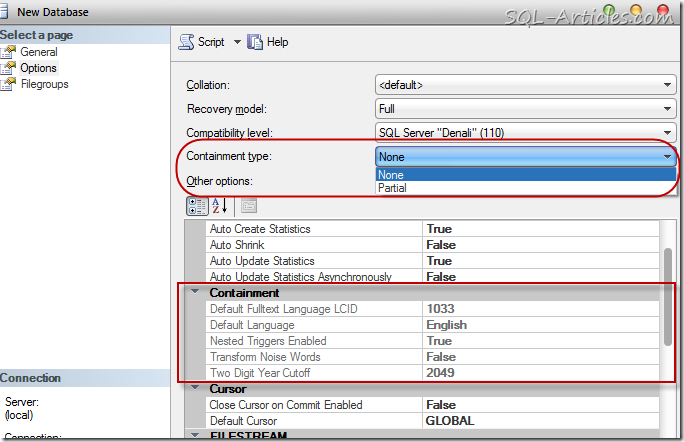
As simple as like that
How to Connect to Contained Database
Once you are done with creating contained database, you will be able to create contained user in the database. The user can be a windows login or SQL login. If it’s SQL login then you will be able to provide the password for the user itself. Let’s create a user in contained database
Through T-SQL
USE [ContainedDB]
GO
CREATE USER [sagar] WITH PASSWORD=N'Test123'
GO
USE [ContainedDB]
GO
ALTER ROLE [db_datareader] ADD MEMBER [sagar]
GO
Through GUI
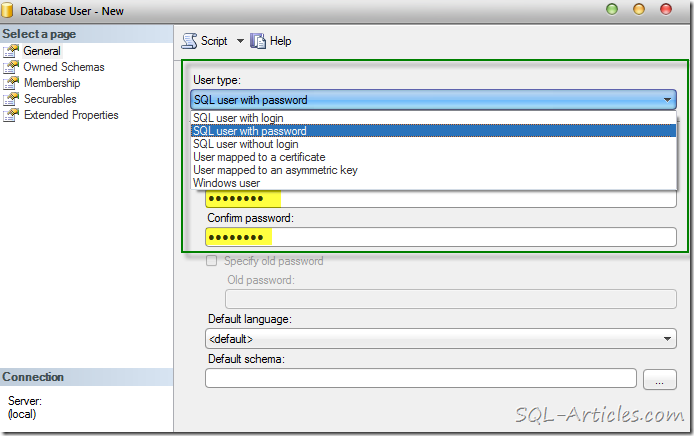
Now lets connect to the server with contained database user. You need to specify the database name in the connection string or else you wont be able to connect to the server, you will be thrown login failed error message like below. The user won’t have access outside the database entity, you will be able to do the work within database only.
Error: 18456, Severity: 14, State: 5.
Login failed for user ‘sagar’. Reason: Could not find a login matching the name provided.
Through SQLCMD
SQLCMD -S. -Usagar -PTest123 –dContainedDB
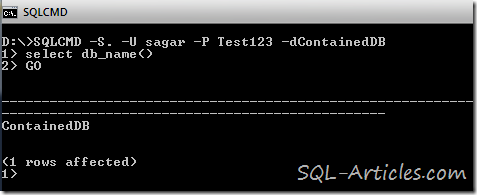
Through GUI
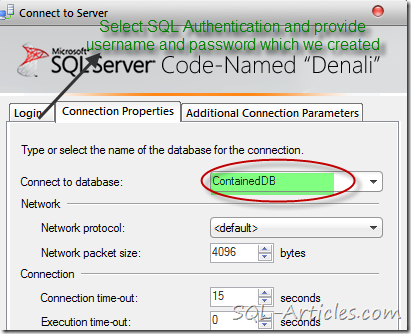
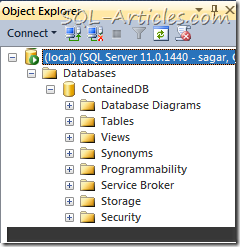
If you see the image above the user wont be able to do anything outside the contained database.
Will I be able to connect as contained SQL User if the server is configured as windows authentication?
No, you won’t be able to connect as contained SQL User if the server is configured as windows authentication, you will get the below error
Error: 18456, Severity: 14, State: 58.
How to identify Uncontained Object in Contained database?
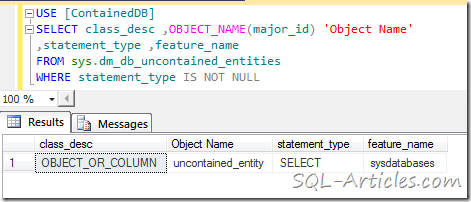
There is possibility to have uncontained object in contained database, that means the object which refer the objects outside the database scope. If you have a contained user then he won’t be able to use those objects, to find this MS has introduced a new catalog view sys.dm_db_uncontained_entities. Let’s do a test, I’m going to create a object using three part identifier and let’s see if contained user is able to access and the view is able to find it
Creating a uncontained object
CREATE PROC [dbo].[uncontained_entity]
AS
SELECT * FROM master.dbo.sysdatabases
GO
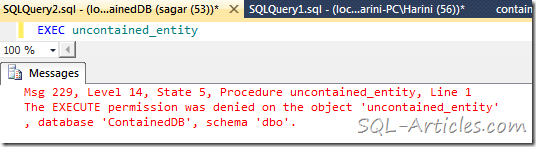
When I tried to execute this proc the user is getting permission denied error as shown below, however you wont be able grant access to the user in master db
Let’s find out this uncontained entity using the view mentioned above
USE [ContainedDB]
GO
SELECT class_desc ,OBJECT_NAME(major_id) 'Object Name'
,statement_type ,feature_name
FROM sys.dm_db_uncontained_entities
WHERE statement_type IS NOT NULL
How to find list of Contained user in the contained database?
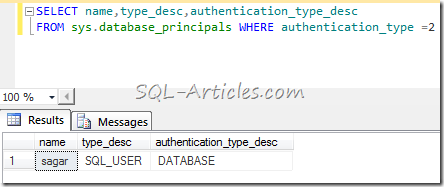
New columns has been added to sys.database_principals view as contained users will not be listed in logins on master db. You can use the query below
SELECT name,type_desc,authentication_type_desc
FROM sys.database_principals WHERE authentication_type =2


Leave a Reply