Disk space (including mounted drive) Check via SQL Server

Written by VidhyaSagar. Posted in Scripts

In my previous article on Diskspace Check via SQLServer will find only physical logical drives that is attached to the system i.e the drive which you see under my computer. Ive used this script in one of my client machine and found that this script is not capable to check disk space for mounted drives. Hence Ive written an WMI script and SQL Script (like version 1) to fetch both physical disk & mounted disk space details. I hope this would help most of the DBAs to monitor their mounted voulmes where they have hosted their database files.

In the script below Ive just provide you the output of total disk space, free space details. You can modify the SQL Script further to suite for your requirement.

Version : 2

How to Use

  • Download both the scripts and save it to your local drive
  • In SQL Script you need to change the parameter @VBSPATH to the path where you have stored the WMI Script including the file name
  • Save the script
  • Use the modified SQL Script to know the disk details

Download SQL Script

Download WMI Script

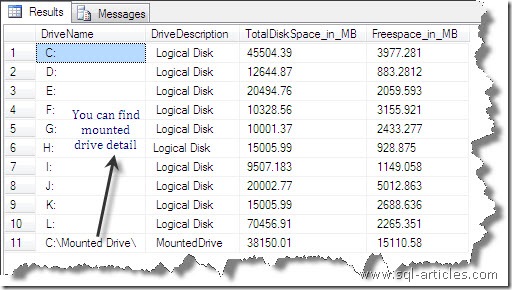
To shown an example Ive mounted a drive to C:Mounted Drive folder and executed the script.

Sample Output
mounteddrive_v2

VN:F [1.9.17_1161]
Rating: 0.0/5 (0 votes cast)
VN:F [1.9.17_1161]
Rating: 0 (from 0 votes)

Tags: , , ,

Trackback from your site.

Comments (1)

  • Praveen

    |

    Hi Sagar, Your script is working great. Thanks ton

    Reply

Leave a comment

*

Recent Comments

Amit Bhatt

|

Hi Deepak,

Thanks for such a nice article.

You missed one thing to add in code:
@article = ‘all’,

Hence the script will be like this:
EXEC sp_addsubscription
@publication = ‘mypublication’,
@article = ‘ALL’,
@subscriber = ‘Subscriberservername’,
@destination_db = ‘mydestinationdbname’,
@reserved=’Internal’

Error 18486 | Platformblog

|

[...] SQL-Articles » Troubleshooting Login failed Error 18456This is one of the infamous error message (and number) that most of the DBAs …. 18486. Login failed for user ‘%.*ls’ because the account is currently locked out. [...]

VidhyaSagar

|

Naveen,
I’ll check this out and get back to you.

balakiran

|

Thanks man, Very simple & easy to understand !!!!